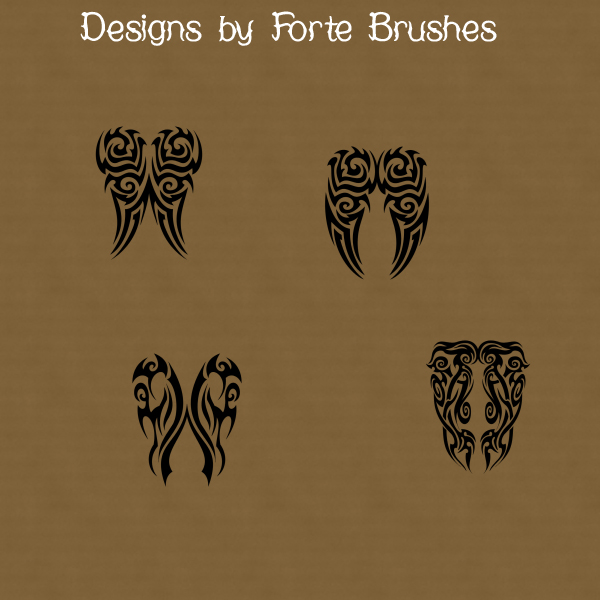
There is something timeless about the bold, flowing lines of tribal art. Whether you are working on a dark fantasy composite, a edgy piece of digital stationery, or simply want to add some symmetrical flair to your latest project, my new Tribal Wings brush collection for Paint Shop Pro is designed to make an impact.
What’s Inside the Set?
This pack features four unique tribal wing designs. Each one is crafted with a balance of sharp tapers and organic curves, giving you that classic ink-inspired look without the need for complex vector work.
Intricate Symmetry: Perfectly balanced designs that look great as focal points or subtle background accents.
High Resolution: Crisp edges that hold up whether you are working on a small web graphic or a high-res print.
PSP Native: Specifically formatted for Jasc/Corel Paint Shop Pro, making them easy to import and use immediately with the Brush tool.
Design Ideas
Not sure where to start? Here are a few ways to put these wings to work:
Digital Art: Use them as a base for character design or “tattoo” elements on your digital portraits.
Product Branding: These motifs work exceptionally well for bold, alternative brand logos or packaging accents.
Themed Backgrounds: Lower the opacity and use them as a repeating pattern for a textured, edgy backdrop.
Mixed Media: Incorporate them into digital papers or masks to add a touch of “Whimsigoth” or Gothic style to your layouts.
How to Use
Simply download the JHS file and place it in your Brushes folder within your Paint Shop Pro directory. Once you refresh your brush tip library, you’ll be ready to start “flying” through your next creative project!
